

20 Apr Download Aadhar Card Name Change Form PDF — Karnataka 2026 Guide
Download Aadhaar Card Name Change Form PDF — Karnataka Guide (2026)
Your essential roadmap to accessing and correctly filling the Aadhaar Update Form in Karnataka. Avoid rejections with our verified 2026 instructions.
By Sahil Singh, document assistance consultant based in Bengaluru | Updated April 2026
Table Of Contents
Online Gazette Application Form
The form in itself takes 5 minutes to complete. The issues occur prior to that one - wrong version downloaded, wrong section checked, name typed in such a way that it does not match the supporting document.
Something I have personally observed several times: a person prints the Aadhaar Enrolment Form, rather than the Update Form. These are two varieties. Enrolment Form is to be used by the individuals, which do not have Aadhaar yet. Corrections and changes are made on the Update Form. Bring the wrong one to the Seva Kendra, and you fill the right one in there, which is contrary to the idea of going prepared.
This guide includes information on where to obtain the appropriate form, how to fill it correctly to change name in Karnataka and what applications are rejected before the operator can even look at the document.
Where to Get the Aadhar Update Form PDF Download Karnataka
There's one source you should trust: the UIDAI official website.
Direct download: https://uidai.gov.in/images/UpdateRequestForm_English.pdf
This is the PDF version of the Aadhar update form that is downloaded by the residents of Karnataka - the same form used by all over India to make corrections to name, address, date of birth and gender. It's free to download.
The UIDAI portal does not have a Karnataka-specific version, but there are numerous BangaloreOne and KarnatakaOne centres that maintain printed versions of the site (English/Kannada) at the counter. If you would prefer to write it in Kannada, request one when you arrive.
What NOT to download:
- The Aadhaar Enrolment Form — this is for first-time Aadhaar applicants only.
- PDFs from third-party sites that charge for the download — the form is free, always.
Print it on standard A4 paper. Black and white is fine. No special paper needed.
Is There a Specific Aadhar Card Name Change in Karnataka Form in Kannada?
Not on the UIDAI portal. The official language is standard and English-medium in all the states.
Practically, bilingual versions are usually printed and kept on the counter at Karnataka government service centres, BangaloreOne and KarnatakaOne and at Atalji Janasnehi Kendras. These are not forms of variation. The same sections, same fields, same requirements. Only printed in Kannada with English to facilitate reading.
In case it is more comfortable to fill the English version, download the UIDAI form and arrive filled in. If you would like to fill in Kannada, go in and request the bilingual copy. Either works.
How to Fill the Aadhar Card Name Change in Karnataka Form
Get this right before you go. Coming with a pre-filled, clean form saves time at the counter — especially at busier centres like Gandhi Nagar or Jayanagar on weekday mornings.
Use a black or blue ballpoint pen. Write in BLOCK LETTERS throughout. No gel pens. No pencil. No whitener if you make an error — cross it out with a single line, write the correction above it, and initial it. Overwriting and whitener are both rejection triggers.
Section by Section Guide:
- Section 1 — Aadhaar Number: Write your 12-digit Aadhaar number in the individual boxes at the top. One digit per box. Don't skip this — the operator pulls your record using this number.
- Section 2 — Fields to Update: Tick the box next to "Name." If you're also updating your address or photograph in the same visit, tick those too. One form, one visit, multiple updates.
- Section 3 — Full Name: This is the field that matters most. Write your complete new name — first name and surname both — exactly as it appears on your Proof of Identity document. Not your preferred spelling. Not a shortened version.
Example: If your POI says "ANJALI HEGDE" — write "ANJALI HEGDE." If there's a middle name on the document, include it. - Section 4 — Mobile Number: Don't leave this blank. The OTP for tracking and SMS confirmation goes to this number. If your registered mobile number has changed, update it here.
- Section 5 — Proof of Identity (POI) Details: Write the name of the document you're attaching: "Marriage Certificate," "PAN Card," "Gazette Notification," etc.
- Section 6 — Signature or Thumb Impression: Sign at the bottom right. For minors, the parent or guardian signs and fills in the Guardian Details section.
- Address section: Even if you're not changing your address, write your current address as registered in the Aadhaar system. This ensures the updated physical PVC card is mailed to the right location.
Common Mistakes That Get Forms Rejected
| Mistake | Reason for Rejection |
|---|---|
| Document Mismatch | The name written in Section 3 must match the POI document exactly, letter for letter. |
| Surname Only | Writing only the new surname instead of the full name. The form asks for the complete new name. |
| Whitener Usage | Using whitener or overwriting. A single clean cross-out with an initial is acceptable, but whitener is not. |
| Missing Mobile Number | Leaving the mobile number blank. Without it, UIDAI can't send OTP or status updates. |
| Wrong Form | Using the Enrolment Form instead of the Update/Correction Form. Check the title at the top. |
Where to Submit the Form in Bangalore and Karnataka
For Aadhar card name change in Karnataka form submissions involving complex documents — Gazette notifications, surname changes after adoption, minor's name corrections — stick with a dedicated ASK centre.
- Aadhaar Seva Kendras (ASK) — Bengaluru: Gandhi Nagar, Jayanagar, and Hebbal.
- State Government Centres: BangaloreOne and KarnatakaOne centres across the city.
- Atalji Janasnehi Kendras: Available at taluk level across Karnataka, useful outside Bengaluru.
- Banks and Post Offices: Designated branches of SBI, Canara Bank, and India Post. Call ahead to confirm.
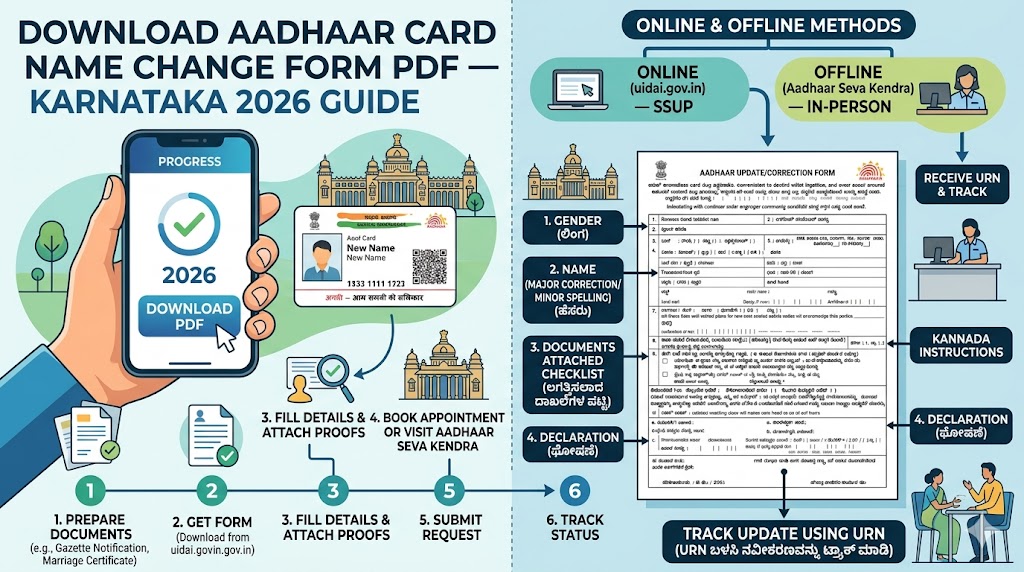
Step-by-Step: How to Fill and Submit the Form
- Step 1 — Download and print: Get the Aadhar update form PDF download Karnataka from the official UIDAI website.
- Step 2 — Write the Aadhaar number: 12 digits, one per box, at the top of the form.
- Step 3 — Tick "Name" in fields section: Add other updates (address, photo) if needed in the same visit.
- Step 4 — Write full new name in BLOCK LETTERS: Exactly as it appears on your supporting document.
- Step 5 — Fill in gender and mobile number: Mobile number is mandatory for linking.
- Step 6 — Write the POI document name: e.g., "Marriage Certificate" or "Gazette Notification."
- Step 7 — Sign the form: Bottom right corner. Guardian signs for minors.
- Step 8 — Carry originals and photocopies: Original for verification, photocopy stays on file.
- Step 9 — Submit and pay ₹50: The standard service fee. Collect your URN acknowledgment slip.
Frequently Asked Questions (FAQ)
Where can I get the official Aadhar update form PDF download Karnataka?
It is free to download on the UIDAI official site at uidai.gov.in and also, it is available physically at BangaloreOne and KarnatakaOne centres. Do not download it on third-party sites that would require payment as the form is free.
Is there a specific Aadhar card name change in Karnataka form in Kannada?
There is no Kannada-only version in the UIDAI portal. The common one is in English. At the counter of many state centres in Karnataka there are bilingual printed copies, ask them to give you one when you arrive should you wish to fill in Kannada.
Do I need to pay for the Aadhar card name change in Karnataka pdf?
The Aadhar card name change in Karnataka pdf is free to download. The ₹50 fee is for the update service at the Seva Kendra — not for the form itself.
Can I use the same form for a name and address update in Bangalore?
Yes. The Aadhaar Update Form allows you to fill in across various fields together on the same form: Name, Address, Date of Birth, Gender. A single visit, single ₹50 fee will take care of all the updates you choose.
Which section do I fill for name correction in the Aadhar update form PDF download Karnataka?
Tick "Name" in the Fields for Update section, then write your complete corrected name in the "Full Name" field under Details to be Updated. Write the full name — not just the part being corrected.
Can I print the Aadhar card name change in Karnataka pdf on a normal A4 sheet?
Yes. Standard A4, black and white print, no special paper. All Karnataka Aadhaar centres accept this.
Is a signature mandatory on the Aadhar card name change in Karnataka form?
Yes. Sign at the bottom right of the form. If signing isn't possible, a thumb impression works. For a minor's update, the parent or guardian signs and fills the Guardian Details section.
How do I fill the name field if I only want to change my surname?
Write your complete new name — first name plus new surname — in the field. Don't write only the new surname. The field expects a full name. "PRIYA HEGDE," not just "HEGDE."
Where can I find an Aadhar card name change in Karnataka form near me?
Any Atalji Janasnehi Kendra or Post Office Aadhaar Centre at the taluk level carries printed copies. For Bengaluru, BangaloreOne and KarnatakaOne centres are the most accessible. Or just download and print from the UIDAI website.
Does the form change if I am applying for a minor's name change?
Same form. The variance is that the parent is to fill in and sign the Guardian Details section at the bottom. The Aadhaar number of the child is written on the top; the parent on the bottom.
Forms and submission processes are up to date by early 2026. UIDAI periodically revises its forms - to be sure you have the latest version, always download it using the official UIDAI portal.