

21 Apr Aadhaar Card Name Change Form PDF Download (2026) | Karnataka Guide
Download Aadhaar Card Name Change Form PDF — Karnataka Guide (2026)
By Deborah Priyadharshini, document assistance consultant based in Bengaluru | Updated April 2026.
Table Of Contents
Online Gazette Application Form
The form itself does not take more than five minutes to be filled in, yet the actual trouble begins prior to that. This may be downloaded incorrectly, or the wrong box may be selected or the name may be typed in a dissimilar manner compared to the supporting documents.
This has been the case with me on numerous occasions. Individuals go ahead and download the Aadhaar Enrolment Form with the assumption that it will take everything in its stride. But it doesn’t.
Should you put that ill-omened form upon the wrong form you will not be in any fix really—but you will fill the right form there. And that is your time at home preparing is not of much help.
This guide is going to assist in getting the right form, filling it properly to change name in Karnataka and prevent minor errors which can cause your application to be rejected even before it gets checked.
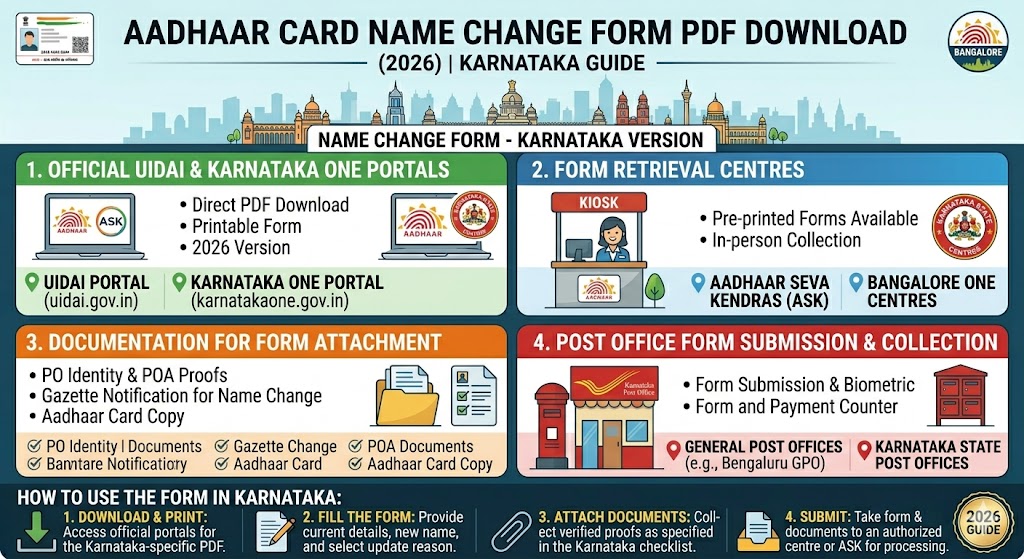
Where to Get the Aadhaar Update Form PDF Download Karnataka:
The only source you should trust is the official UIDAI website. You can download the form directly from the official UIDAI website here:
- What NOT to download: Do not download the Aadhaar Enrolment Form if you are only correcting details.
- Avoid Third-Party Sites: Do not use sites that demand money to fill out the form; UIDAI provides it for free.
- Print Quality: Once obtained, print it on normal A4 paper. Black and white is perfectly fine.
Is There a Specific Aadhaar Card Name Change in Karnataka Form in Kannada?
No, you will not find a separate form in the UIDAI portal for different states. The Aadhaar form is similar throughout India, printed only in English.
However, in Karnataka service centres such as BangaloreOne, KarnatakaOne, and Atalji Janasnehi Kendras, you will find that the Aadhaar application forms are already printed and ready at the counter in both English and Kannada. These are not different forms because the layout, sections, and requirements are identical to the UIDAI nationwide standard.
If you know English, you can download the UIDAI form and fill it at home. If Kannada is more comfortable, you can visit a service centre and ask for the bilingual printed form. Both are absolutely valid.
How to Fill the Aadhaar Card Name Change in Karnataka Form
Doing this right at home is the difference between a quick visit and a long delay at the counter. Pre-filled forms help you get through high-traffic centres like Gandhi Nagar or Jayanagar much faster.
- Pen Choice: Use a plain black or blue ballpoint pen and neatly fill the form using BLOCK LETTERS. Avoid gel pens and pencils.
- Errors: If you make an error, do not use whitener. Simply draw a light single line over it, write the correct detail above, and place your initials next to it.
- Section 1 (Aadhaar Number): Enter your 12-digit Aadhaar number clearly, one digit per box. This is what the operator uses to access your records.
- Section 2 (Field to Update): Select what you need to change by checking the correct box. For a name change, tick "Name". You can tick multiple boxes if updating address or photo simultaneously.
- Section 3 (New Name): Write your complete new name exactly as it appears on your Proof of Identity (POI) document. Do not shorten or reformat it. If the document says "ANJALI HEGDE", write "ANJALI HEGDE".
- Mobile Number: Do not leave this blank. It is required for OTP verification and SMS alerts.
- Proof of Identity: Type the exact name of the document you are presenting (e.g., Marriage Certificate, PAN Card, or Gazette Notification).
- Signature: Sign at the bottom right. For minors, a parent or guardian must sign and fill the Guardian Details section.
Even if you aren't changing your address, always write your current address registered in Aadhaar clearly. This ensures your records remain clean and your PVC card (if ordered) reaches the correct destination.
Common Mistakes That Get Forms Rejected
| Mistake | Impact |
|---|---|
| Name Mismatch | If the form says "Priya Ramesh Sharma" but the POI says "Priya Sharma", it will be rejected. |
| Surname Only | Filling only the new surname (e.g., "HEGDE") instead of the full name ("PRIYA HEGDE") leads to rejection. |
| Whitener Use | Aadhaar forms with whitener or heavy overwriting are not accepted. Initial minor corrections instead. |
| Blank Mobile Number | UIDAI cannot send OTP or status updates, causing the operator to halt the process. |
| Wrong Form Type | Using the Enrolment Form instead of the Update/Correction Form. |
Where to Submit the Form in Bangalore and Karnataka
- Aadhaar Seva Kendras (ASK): Locations like Gandhi Nagar, Jayanagar, and Hebbal are best for complex cases like Gazette-based name changes or minor name corrections.
- BangaloreOne / KarnatakaOne: Convenient and reliable for basic name corrections and minor updates across the city.
- Atalji Janasnehi Kendras: Located at the taluk level, these are ideal for residents outside Bengaluru.
- Banks & Post Offices: Only specific branches of SBI, Canara Bank, and India Post offices accept Aadhaar updates. Always call ahead to verify.
How to Fill and Submit — The Complete Sequence
- Enter your 12-digit Aadhaar number (1 digit per box).
- Tick "Name" under the Fields to Update section.
- Key in your complete new name in BLOCK LETTERS as per the POI.
- Enter your gender and functional mobile number.
- Mention the exact name of your Proof of Identity document.
- Sign at the lower right-hand corner.
- Submit: Carry original documents and photocopies to the centre. Pay the ₹50 update fee (the form download itself is free).
- Receive your URN confirmation slip to track status on the UIDAI portal.
Frequently Asked Questions (FAQs)
Where can I get the official Aadhar update form PDF download Karnataka?
You can download the form for free from the official UIDAI website at uidai.gov.in. You can also get printed copies at BangaloreOne and KarnatakaOne centres.
Is there a specific Aadhar card name change in Karnataka form in Kannada?
There is no standalone Kannada form on the UIDAI portal. However, most Karnataka centres provide printed bilingual (English & Kannada) copies at the counter.
Do I need to pay for the Aadhar card name change in Karnataka pdf?
The Karnataka Aadhaar name change form PDF is a free that can be downloaded on the official UIDAI site. The form itself is free of charge. According to the recent UIDAI charges on services, the ₹50 charge is only paid at the Seva Kendra when requesting an update, not when downloading or filling out the form.
Can I use the same form for a name and address update in Bangalore?
Yes, you can select multiple fields like Name and Address on a single form and complete both updates in one visit for the same fee.
Which section do I fill for name correction in the Aadhar update form PDF download Karnataka?
Tick "Name" in Section 2 (Fields for Update) and then enter your full corrected name in Section 3 (Details to be Updated).
Can I print the Aadhar card name change in Karnataka pdf on a normal A4 sheet?
Yes, a regular A4 sheet in black and white is perfectly acceptable at every Aadhaar centre in Karnataka.
Is a signature mandatory on the Aadhar card name change in Karnataka form?
Yes, a signature or thumb impression is mandatory at the bottom right. For minors, the guardian must sign.
How do I fill the name field if I only want to change my surname?
You must still write your full name (First name + New Surname). Entering only the surname is not permitted.
Where can I find an Aadhar card name change in Karnataka form near me?
You can find them at Atalji Janasnehi Kendras, BangaloreOne, KarnatakaOne, or certain Post Offices. Alternatively, print it from the UIDAI website.
Does the form change if I am applying for a minor's name change?
The form is the same. You just need to fill the "Guardian Details" section and have the parent/guardian sign the application.